

Most articles about low code no code explain the difference between the two and stop there. That’s table stakes, not value. The harder question — the one that actually moves your business — is where each one belongs in a SaaS company and what it costs you on the back end when you choose wrong. A no-code workflow tool can pay for itself in 90 days when applied to internal operations. The same no-code platform powering your customer-facing product can quietly shave 0.5x off your revenue multiple at exit. Both statements are true, and the only difference is where you used it.
If you run a B2B SaaS company in the $5M–$15M ARR range, you’re making three decisions about every meaningful piece of software in your operation: build it custom with your engineering team, buy a finished SaaS product, or assemble something in the middle on a low-code or no-code platform. This guide gives you a decision framework for that choice — the buy/build/internalize question — with the math, the governance model, the vendor lock-in analysis, and the exit-valuation implications most CEOs find out about a year too late.
What Low Code and No Code Actually Are (and Aren’t)
No code is a visual development platform where the entire application is built by configuring pre-built components — drag, drop, connect, publish. No source code is written by the user. Examples: Bubble, Webflow, Airtable, Zapier, Glide, Softr. The intended user is a non-engineer.
Low code is a visual development platform that gets you 80% of the way there with drag-and-drop, then lets you extend it by writing code (typically JavaScript, Python, or a platform-specific scripting language) for the parts the visual builder can’t handle. Examples: OutSystems, Mendix, Retool, Power Apps, Appsmith. The intended user is a developer or technical analyst who wants to ship faster than writing the whole stack from scratch.
The line between the two has blurred. Most “no-code” platforms now allow some kind of formula language or scripting hook; most “low-code” platforms now ship visual builders that a smart non-engineer can use for simple cases. For practical purposes, treat them as a continuum:
| Spectrum point | Who builds it | Customization ceiling | Typical use |
|---|---|---|---|
| Pure no-code | Business operator | Low — what the platform supports | Internal workflows, simple internal apps |
| No-code with formulas | Power user / RevOps | Medium — formulas, automations, integrations | Customer portals, dashboards, configurators |
| Low-code visual + scripting | Junior developer | High — anything the platform's API exposes | Internal product features, admin tools |
| Low-code + extensive custom code | Mid-level engineer | Very high — only platform constraints matter | Production B2B applications |
| Full custom code | Senior engineering team | Unlimited | Core product, performance-critical systems |
The labels matter less than where on this spectrum a given decision sits. The decision rule below works the same regardless of whether the platform you pick calls itself “no code” or “low code.”
Why This Decision Matters More Than the Label
Every dollar your engineering team spends building something that already exists as a product is a dollar that didn’t go into your moat. In a SaaS company spending 15–25% of revenue on engineering, that’s a significant capital allocation question. For a $10M ARR company, that’s $1.5M–$2.5M per year. Every internal tool you build from scratch consumes a slice of that budget that could have funded the features your customers actually pay you for.
Low code no code platforms exist because most of the software your business needs is not differentiated. It’s plumbing. The reader’s CRM workflow, the approval routing for purchase orders, the customer onboarding checklist, the internal Slack bot that pings the sales team when a deal closes — none of those are why customers pay you. None of them belong on your product roadmap. But every one of them takes engineering time if you build them yourself.
That’s the upside. The downside is exactly the same property: low code no code platforms make it cheap to build software. So they make it cheap to build software that shouldn’t have been built — internal apps that should have been bought as SaaS, workflows that should have been outsourced, customer-facing features that should have been engineered properly. The cost shows up later, usually at exit, in the form of:
- Customer concentration risk in your vendor stack (“90% of our customer-facing tooling runs on Bubble”)
- Performance ceilings that block you from moving upmarket
- Security and compliance gaps that fail enterprise procurement
- Maintenance debt that grows faster than the team can absorb it
- Valuation discounts because acquirers can’t audit what they can’t read
The framework below tells you when each risk is acceptable and when it isn’t.
The Buy/Build/Internalize Decision Framework
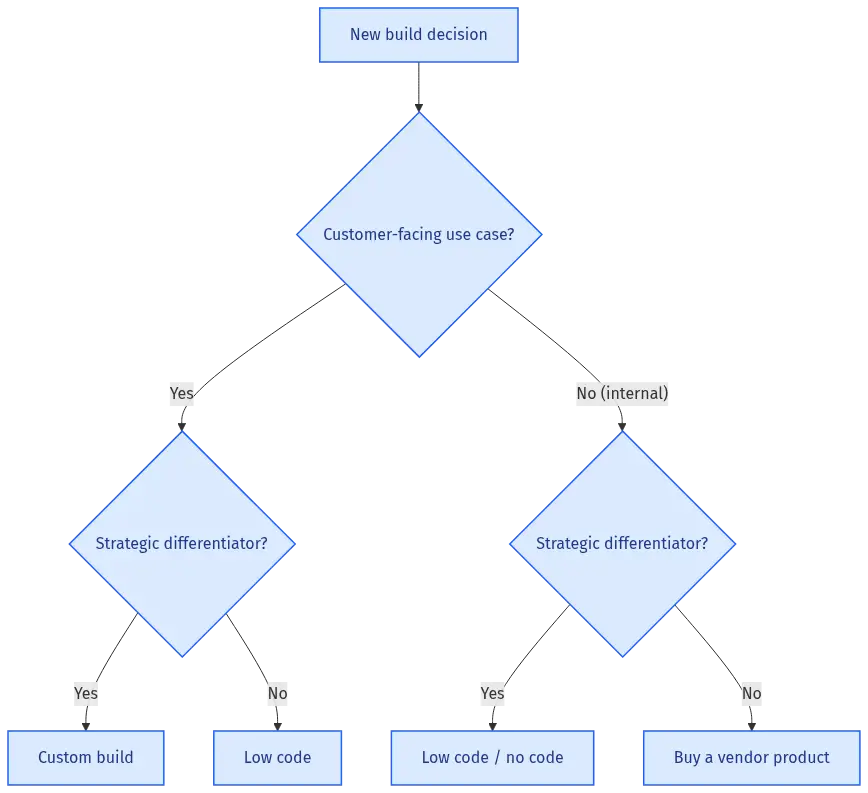
Where Each Approach Wins
There are four options for every piece of software your business needs:
- Buy — Pay for a finished SaaS product (HubSpot, Salesforce, Gong, Slack)
- Build with no-code — Assemble a custom application on a no-code platform
- Build with low-code — Assemble a custom application on a low-code platform, extended with code
- Build with full code — Engineer it from scratch with your own development team
The right choice depends on two questions. Ask them in order.
Question 1: Is the software customer-facing or internal?
Customer-facing means it’s part of what customers pay you for, or it’s something they directly use as part of their experience with your company (the product itself, the customer portal, the onboarding flow, the in-app messaging). Internal means it’s used by your team to run the business (CRM workflows, employee onboarding, approval routing, internal dashboards, sales commission calculations).
Question 2: Is the function strategic or commodity?
Strategic means it’s a source of competitive advantage — it’s the reason customers choose you, or it’s what makes your team meaningfully better than competitors. Commodity means every company in your space needs it, nothing about your version is distinctive, and the same vendor sells the same thing to your competitor.
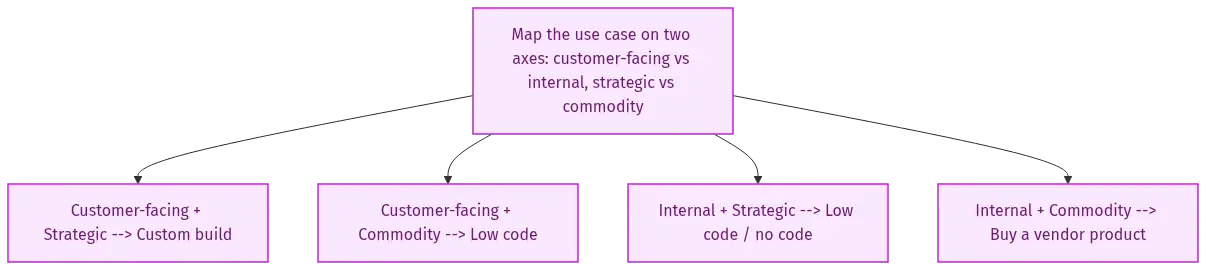
The 2x2 of those two questions gives you the answer:
| Quadrant | Use case profile | Recommended approach | Why |
|---|---|---|---|
| Customer-facing + Strategic | Core product features, pricing engine, differentiated workflows | Full custom code | This is your moat. Anything that compresses your engineering optionality compresses your valuation. |
| Customer-facing + Commodity | Customer portal login, basic dashboards, standard integrations | Low code with caution, or buy a vendor with embeddable widgets | Acceptable if the platform is enterprise-grade and your customer base tolerates the vendor brand. Document the migration path. |
| Internal + Strategic | Sales commission engine, customer health scoring model | Low code or custom, depending on team size | If only one person understands it, you've built a dependency, not a system. Low code wins when it forces documentation. |
| Internal + Commodity | Approval workflows, employee onboarding, internal CRM, expense routing | No code or buy an off-the-shelf SaaS | This is the sweet spot for no-code. Pure leverage — engineering time saved, business value delivered, nothing strategic at risk. |
Most SaaS CEOs get the bottom-right quadrant right (they buy or no-code their internal tooling) and the top-left quadrant right (they custom-build their core product). The expensive mistakes happen in the other two quadrants — usually because the urgency in the moment outweighs the math on the back end.
Scenario #1: Internal Tools — When No-Code Pays for Itself in 90 Days
A $7M ARR B2B SaaS company runs new customer onboarding manually. The CSM gets a Slack ping when a deal closes, opens a Notion template, copies the customer info, creates a Slack channel, sends a calendar invite, kicks off three emails on a 7‑day cadence, and logs the activity in HubSpot. Total time per new customer: 90 minutes. Total new customers per month: 25. Total monthly time: 37.5 hours. At a fully-loaded CSM cost of $90/hour, the labor cost is $3,375/month.
The CSM team has been asking for an automation. Engineering quotes 6 weeks at 1.5 FTEs to build a custom internal tool — roughly $50,000 in burdened engineering cost. The CEO declines, correctly, because that engineering team should be shipping product features that drive new sales.
Alternative: a no-code platform like Zapier or Make, integrated with HubSpot, Slack, Notion, and the email tool, plus a small Airtable database to track onboarding progress. Build time: 2 weeks of one operations person’s time. Cost: roughly $800 in labor + $400/year in platform licenses.
Payback math:
- One-time build cost: $800
- Monthly savings: $3,375 in labor minus $33 in platform license = $3,342
- Payback period: $800 ÷ $3,342 = less than 1 month
- Year‑1 net savings: $39,300
This is the canonical no-code win. The work is internal, the function is commodity, the engineering alternative is prohibitively expensive, and the platform license cost is rounding error. The reader should do this kind of project every quarter, ideally several per quarter.
The pattern: identify any repetitive internal task that’s costing more than ~$2,000/month in labor and has clear inputs and outputs. Automate it on no-code or buy a vendor. If neither is possible, only then should engineering get the request.
Scenario #2: Customer-Facing Product — The Hidden Valuation Hit
A $12M ARR SaaS company sells a vertical workflow tool to mid-market construction firms. The core product is fully custom-coded. But the customer portal — where customers log in, see their account, manage users, review invoices, and update billing — was built on a low-code platform two years ago because engineering was slammed building the core product.
The decision felt right at the time. The portal is undifferentiated. Customers want it to work, not to be remarkable. Building it on low-code saved ~4 months of engineering. The platform license costs roughly $50,000/year.
Three years later, the company is being acquired. The due diligence team uncovers the low-code dependency. The acquirer’s technical diligence partner runs three calculations:
- Migration cost to native code: $400,000 in engineering work over 8 months
- Continued license exposure: $50,000/year × 5 years of holding period = $250,000
- Risk premium: the platform vendor was acquired last year and is signaling a pivot to enterprise pricing, projecting a 3x license increase over the next 24 months
The acquirer doesn’t kill the deal. But they reduce the offer by 0.4x of revenue — roughly $4.8M off a $12M ARR business — to absorb the migration risk and license uncertainty.
The original “savings” from using low-code: 4 months of engineering at, say, $500,000. The cost at exit: $4.8M reduction in offer price, before the migration spend and license exposure. Net economic loss: roughly 10x what was saved.
This is not a hypothetical scenario. It’s the most common low-code failure mode in mid-market SaaS. The fix is not to ban low-code from customer-facing surfaces — that’s overcorrection. The fix is to:
- Document the migration path before you ship the low-code surface. Where does the data live? What’s the export format? What’s the estimated cost to rebuild in native code?
- Set an ARR threshold for migration. “We will rebuild the customer portal in native code before $20M ARR, no exceptions.” Put it in the engineering plan.
- Disclose proactively in diligence. Acquirers penalize surprises more heavily than known risks. If you walk into diligence with the migration plan already documented, the valuation hit shrinks substantially.
The connection back to SaaS unit economics is direct. Low-code on customer-facing surfaces is borrowed time. You’re trading engineering hours today against valuation dollars tomorrow. Sometimes it’s the right trade. Sometimes it isn’t. The point is to do the trade with eyes open, not by accident.
Scenario #3: The No-Code MVP Trap
A solo non-technical founder builds the entire product on Bubble. He gets to $200K ARR with three employees. The product works, customers like it, the unit economics are roughly fine. He’s now raising a seed round and the lead investor asks the question: “Is this rebuildable in native code, and what’s the cost?”
The honest answer at $200K ARR is: it doesn’t matter yet. The fastest path to product-market fit was the right path, full stop. Building a custom-coded product first would have killed the company. The no-code platform did its job — got the founder to validated demand at a fraction of the cost of custom engineering.
The honest answer at $3M ARR is: start the rebuild now, because performance ceilings are weeks away, not years away.
The honest answer at $10M ARR running on no-code is: you’re in trouble. Enterprise prospects are failing your security review. The platform can’t handle your concurrency. Your team can’t hire the engineers you need because nobody wants to be the senior engineer on a Bubble app. You’ve underinvested in re-platforming and now you’re trying to do it under acquisition pressure with no senior engineers on staff.
The pattern: no-code is the right answer for getting to validated PMF after MVP and finding product-market fit, but you need to start the migration to custom code somewhere between $1M and $5M ARR — earlier if your customers are enterprise, later if they’re SMB.
If you’re a non-technical founder reading this, the non-tech SaaS founder guide goes deeper on how to make this transition without losing control of your own product.
The Real Cost of a Low-Code Platform: Beyond the License Fee
Most CEOs evaluate low code no code platforms on the per-seat licensing cost. That’s the visible number — $30/user/month, $500/user/month, whatever the vendor’s pricing page says. It’s also the smallest part of the total cost.
Here’s the full cost stack you actually pay over a 5‑year horizon:
| Cost component | What it is | Typical magnitude |
|---|---|---|
| License fees | What the vendor charges per seat or per workflow | $5K–$200K/year depending on scale |
| Implementation cost | Initial build by your team or a contractor | 1.5–3x license fees in year 1 |
| Integration cost | Connecting the platform to your existing stack | $10K–$100K depending on integrations |
| Maintenance cost | Ongoing changes, bug fixes, schema migrations | 20–40% of original build cost per year |
| Platform upgrade cost | When the vendor changes APIs or deprecates features | Episodic, can be $50K+ in a bad year |
| Knowledge concentration cost | When the one person who built it leaves | Loss of months of productivity until rebuilt or documented |
| Vendor lock-in cost | What it costs to leave when you need to | Often $100K–$1M+ for non-trivial applications |
| Performance ceiling cost | When the platform stops scaling and you have to migrate | The full cost of rebuilding from scratch |
The pattern: add the license fee, then add 2–3x for everything else over a 5‑year window. A platform that costs $50K/year in licenses has a 5‑year total cost of ownership closer to $400K-$600K when you include everything. That’s the number to compare against the cost of either custom-building it or buying a finished SaaS alternative.
This is also why “no-code is cheaper than developers” is a half-truth. It’s cheaper than developers for the right use cases. It’s more expensive than developers — by a wide margin — for the wrong use cases.
Vendor Lock-In: The Exit Math You Should Run Now
Every low code no code platform produces an artifact that is, to varying degrees, locked to that platform. Some platforms let you export your data freely. None of them let you export your application logic in a way another platform can import. So switching platforms means rebuilding.
The cost to switch is a function of three variables:
- Complexity of what you built. A 5‑step approval workflow on Zapier takes 30 minutes to rebuild on Make. A 200-screen customer-facing application on Bubble takes 6–12 months to rebuild on a native stack.
- Data portability. Can you export every record, every relationship, every file attachment? Can the new platform import it without manual remapping?
- User migration cost. If end users are using the platform’s hosted UI (login pages, dashboards, workflows), switching means re-training every user, updating every link, and absorbing the productivity hit of the transition.
The right time to estimate switching cost is the day you commit to the platform, not the day you need to leave it. Write the migration plan as part of the platform selection. If you can’t write a credible migration plan, you’ve signed up for an open-ended vendor dependency, and you should treat that as a strategic risk on your risk register.
Connect this back to the six revenue multiple drivers acquirers use: risk is one of the largest. Vendor dependencies are visible risks. The way to manage them is not to avoid the platform — it’s to document the exit ramp before you need it.
Performance Ceilings: When Low Code No Code Breaks
Every low code no code platform has limits. The platforms don’t advertise them prominently because the limits are where you stop being a customer. Knowing where they are protects you from finding them in production.
The typical ceilings, by category:
Concurrent users: Most no-code platforms degrade meaningfully past a few thousand concurrent users. Low-code platforms with proper hosting can scale further but often have per-user license economics that make scaling expensive long before scaling is technically broken.
Data volume: No-code platforms with embedded databases (Airtable, Bubble) typically struggle past 100K rows in a single table. Workarounds exist, but they require engineering thinking — which defeats the purpose of using a no-code tool.
Query complexity: Joining across 5+ tables, aggregations over millions of rows, or sub-100ms response time requirements: most no-code platforms can’t do this. Low-code platforms can, but only by writing custom code, which means you’re now operating a hybrid system.
Custom integrations: If a system isn’t on the platform’s integration list, getting it connected typically requires the platform’s API/webhook layer plus custom code on your side. Possible, but the cost approaches custom engineering quickly.
Security and compliance: SOC 2 Type II, HIPAA, FedRAMP, data residency in specific jurisdictions — these are platform-level decisions. If the platform doesn’t support what your customers need, your customers will fail their own audits, and you’ll lose them.
The decision rule: if you can predict that you’ll need to exceed any of these ceilings within 24 months of launch, don’t use the platform for that use case. Build it custom from the start. The pain of migrating mid-flight is far higher than the pain of building it right the first time.
Citizen Developers: Three Governance Models
The single biggest cultural shift low code no code platforms create is citizen developers — people in finance, RevOps, customer success, or sales who build their own tools. This is a feature, not a bug. It lets your engineering team focus on the product while operations teams solve their own problems. But it has to be governed, or you end up with a sprawl of ungoverned applications that nobody can audit and that fail at the worst possible moments.
Three governance models work in practice. Pick one based on your stage and your tolerance for risk.
Model 1: Wild West (works at $1M–$3M ARR)
Anyone can build anything on approved platforms. No approval required. No central registry. If it breaks, the person who built it fixes it.
Works when: The team is small enough that everyone knows what everyone else is building. Risk surface is small.
Breaks when: The first time something built by a former employee silently stops working, costs you a customer, or fails an audit.
Model 2: Federated (works at $3M–$15M ARR)
Each department appoints a “platform owner” responsible for what’s built on each tool. Builders submit a one-page intake (purpose, owner, data accessed, fallback plan) before building. A monthly review surfaces the active inventory.
Works when: You have functional leaders who care about operational excellence and can absorb the governance overhead.
Breaks when: The platform owners are too busy to actually review, and the intake becomes theater.
Model 3: Centralized (works at $15M+ ARR)
A small IT or operations team owns the platform stack. Builders propose, the central team approves, builds, or builds-with the requester. The central team owns documentation, monitoring, and migration paths.
Works when: The scale of internal tooling justifies a small dedicated team.
Breaks when: The central team becomes a bottleneck and individual teams start building shadow IT on platforms not on the approved list.
| Stage | Recommended model | Why |
|---|---|---|
| $1M–$3M ARR | Wild West | Governance overhead > risk |
| $3M–$15M ARR | Federated | Risk justifies governance, central team not yet warranted |
| $15M+ ARR | Centralized | Inventory complexity demands ownership |
The transition from one model to the next is one of the underappreciated parts of scaling a SaaS business. It’s not glamorous, but the alternative — discovering that 40% of your internal operations run on an undocumented Bubble app maintained by a contractor you stopped paying 18 months ago — is worse.
Build vs. Buy vs. Internalize: The Math
The decision framework above tells you which approach fits each quadrant. Once you’ve made that call, run the cost comparison.
For an example: a $10M ARR SaaS company needs a sales commission calculator. The current state is Excel spreadsheets, manually updated, with a 4‑day close cycle every month. Three commission disputes per quarter cost roughly $5,000 each in CFO time, RevOps time, and morale damage. Total cost of the current state: roughly $80,000/year in fully-loaded time and dispute resolution.
Option A: Buy a finished SaaS product (e.g., a vendor like CaptivateIQ, Spiff, or Performio)
- License: $40K/year
- Implementation: $20K one-time
- Year‑1 cost: $60K
- 3‑year cost: $140K
- Time to value: 6–10 weeks
Option B: Build on low-code (Retool or similar) with engineering supervision
- License: $15K/year
- Build cost: $80K (8 weeks of one engineer + RevOps lead)
- Maintenance: $15K/year (10% of build cost)
- Year‑1 cost: $110K
- 3‑year cost: $155K
- Time to value: 8–12 weeks
Option C: Build custom in your own product stack
- License: $0
- Build cost: $250K (12 weeks of full-stack team)
- Maintenance: $40K/year (full stack of engineers, QA, infrastructure)
- Year‑1 cost: $290K
- 3‑year cost: $370K
- Time to value: 16–20 weeks
Option D: No-code (Airtable + Zapier)
- License: $5K/year
- Build cost: $10K (2 weeks of RevOps lead)
- Maintenance: $5K/year
- Year‑1 cost: $20K
- 3‑year cost: $30K
- Time to value: 2–3 weeks
- Caveat: hits performance ceiling at ~150 sales reps with complex plans
Run the framework first. Sales commission calculation is internal and (for most companies) commodity, not strategic. That puts it in the bottom-right quadrant — no-code or buy. Both Option A and Option D are within scope. The choice between them comes down to scale: under 50 reps and simple plans, Option D wins on cost; over 50 reps with complex plans, Option A wins on reliability.
Option B and Option C are wrong answers for this use case. The reader’s engineering team should not be building a commission calculator unless commission calculation is somehow part of the product the company sells.
This is the discipline. Run the framework, then run the math, then pick.
Common Mistakes SaaS CEOs Make with Low Code No Code
Mistake 1: Using no-code to build the product itself past $3M ARR. The MVP is one thing. A scaling business is another. Migration becomes existential past $5M-$10M ARR. Plan the rebuild early.
Mistake 2: Treating low-code as “free engineering.” Every low-code app needs maintenance, security patching, and platform-upgrade absorption. The cost is real, it’s just deferred. Budget for it.
Mistake 3: Hiding low-code in the customer experience. Customer portals, status pages, in-app onboarding flows on low-code platforms create dependencies that show up in diligence. Document them and own the migration path.
Mistake 4: Letting citizen developer programs run without governance. The first time a finance employee builds an unapproved app on a free-tier platform that holds customer data, you have a security incident. Governance is cheap insurance.
Mistake 5: Optimizing for build cost instead of total cost of ownership. The cheapest thing to build is rarely the cheapest thing to own. Look at the 5‑year cost, not the 6‑month cost.
How Acquirers Value Low Code No Code Dependencies
When an acquirer evaluates your business, they’re running a discounted cash flow on the next 5–10 years. Anything that introduces uncertainty into that DCF reduces the multiple. Low code no code platforms introduce uncertainty in five specific ways:
| Concern | Mitigation |
|---|---|
| Platform pricing risk | The vendor can change pricing. Document current spend, contractual protections, and migration cost. |
| Platform deprecation risk | The vendor can shut down features or the whole product. Maintain export-readiness. |
| Technical talent risk | Acquirer's engineering team can't read or extend the application. Quantify rebuild cost. |
| Security posture risk | Platform's compliance status is the platform's, not yours. Document it. |
| Performance ceiling risk | Platform may not scale to acquirer's projected growth. Demonstrate headroom. |
The discount typically applies to customer-facing surfaces (where acquirers see the dependency as core) more than internal tooling (where the acquirer can replace it as part of integration). A SaaS company with extensive no-code internal tooling typically takes no valuation hit; a SaaS company with low-code in its customer-facing product can take 0.2x‑0.6x off the revenue multiple.
If you’re 12–24 months from a SaaS exit, audit your low code no code footprint now. Migrate the customer-facing dependencies to native code before diligence starts. Document the internal ones with clean inventories and migration plans. The valuation gap between an audited platform footprint and an unaudited one is meaningful.
How Low Code No Code Affects R&D Allocation
A SaaS company spending 20% of revenue on engineering at $10M ARR has a $2M annual engineering budget. The CEO’s job is to allocate that budget across three buckets:
- New product features — what wins new customers
- Existing product improvements — what retains and expands existing customers
- Infrastructure and internal tooling — what keeps the lights on
Most CEOs find that bucket 3 quietly grows to consume 30–50% of engineering capacity. Every Slack integration, every internal dashboard, every reporting endpoint that finance asked for — they all come out of bucket 3. By the time you notice, your engineers are spending half their time on internal plumbing and the product roadmap is starved.
Low code no code is the tool that fixes this. Done right, it can absorb 60–80% of bucket‑3 work, which means more of bucket 1 and bucket 2, which is the work that drives the Rule of 40 and grows valuation.
Done wrong, it adds a fourth bucket: maintenance of the low-code platforms themselves, which steals from buckets 1 and 2 anyway. The net effect depends on the governance model and the discipline of staying out of the wrong quadrants.
The connection to unit economics and customer acquisition cost is direct. Engineering hours saved on internal plumbing become engineering hours invested in features that compress CAC payback or expand LTV. That’s where the leverage shows up in the financial model.
When Low Code No Code Is the Wrong Choice
After everything above, here are the four cases where you should stop and pick a different tool:
- The function is your core competitive advantage. If customers pay you specifically because of how your product does X, build X with code. Custom code is the only thing that preserves engineering optionality.
- You are close to or above the platform’s documented limits today. If you’re already at 800 of the platform’s 1,000-row limit, you don’t have a problem yet — you have a problem in 90 days. Don’t paint yourself into a corner.
- The function handles sensitive data or hits regulated workflows. PCI cardholder data, PHI, defense-related data, or regulated financial transactions on a no-code platform is asking for a regulatory finding. The right answer is custom code or a vendor with the certification stack.
- The team doesn’t have anyone to maintain it. A no-code app with no owner is a time bomb. Don’t build something nobody is responsible for.
In every other case — internal tooling, commodity workflows, configurators, dashboards, integration glue, simple customer-facing surfaces with documented migration paths — low code no code earns its place. The decision rule isn’t “always” or “never.” It’s “in the right quadrant, with the right governance, with a documented exit ramp.”
Frequently Asked Questions
Is no code the same as low code?
No. No code platforms don’t let you write custom code; everything is built through visual configuration. Low code platforms give you a visual builder plus the ability to write code for the parts the visual builder can’t handle. The line has blurred, but the core difference is whether engineering skills are required to extend the application.
Is no code cheaper than hiring developers?
For the right use cases, yes — typically 5–10x cheaper for internal tooling that would otherwise consume engineering time. For the wrong use cases, no — total cost of ownership over 5 years often exceeds what custom code would have cost, once you factor in license fees, maintenance, vendor lock-in, and eventual migration. The framework in this article tells you which is which.
Can you build a SaaS product on no code?
Yes, up to a point. Many companies have reached $1M-$5M ARR on no-code platforms (typically Bubble, Webflow, or similar). Beyond that, performance ceilings, security requirements, and enterprise procurement requirements typically force a migration to custom code. If you’re a non-technical founder, no-code is a reasonable way to get to validated PMF — but plan the rebuild.
What’s the difference between low code and traditional SaaS?
Traditional SaaS is a finished product — you sign up, configure your account, and use it as-is. Low code is a platform you use to build your own custom application; you’re not buying a finished product, you’re buying construction materials. The reader’s company is probably both: a traditional SaaS provider to your customers, and a consumer of both SaaS products and low-code platforms internally.
Will AI replace low code no code?
AI-assisted coding (Copilot, Cursor, etc.) is reducing the cost of custom code, which compresses the value of low-code platforms for engineering teams. AI is not yet reducing the cost of no-code for non-engineers, because the bottleneck for non-engineers was never typing code — it was understanding what to build. The likely outcome over the next 24–36 months: low-code shrinks in importance for engineering teams, no-code keeps growing for business operators, custom code with AI assistance becomes the default for anything customer-facing.
How do I audit my current low code no code footprint?
Three steps. First, inventory every platform your company pays for (start with finance — they have the credit card statements). Second, inventory every application built on each platform (every workflow, every dashboard, every customer-facing surface). Third, for each application, capture: owner, business purpose, data accessed, migration cost estimate, and whether it’s strategic or commodity. The output is a one-page risk register. Bring it to your next board meeting.
The Bottom Line
Low code no code is a tool, not a strategy. Used well, it absorbs the 30–50% of engineering capacity that gets quietly consumed by internal plumbing — and redirects it toward features that grow revenue and increase your valuation multiple. Used poorly, it creates platform dependencies that compress your exit valuation, performance ceilings that block you from moving upmarket, and a governance vacuum that turns into a security incident at the worst possible moment.
The decision is not whether to use it. The decision is where. Run the four-quadrant framework on every meaningful piece of software in your operation. Use no-code in the bottom-right quadrant. Use low-code with documented migration paths in the top-right. Custom-build in the top-left. Buy in the bottom-right when you can. And revisit the inventory every quarter, because the right answer in year one is rarely the right answer in year five.
The SaaS CEOs who get the most out of low code no code are the ones who treat it the way they treat every other capital allocation decision — with a framework, a budget, a measurement system, and an exit plan.