
Most SaaS founders between $5M and $15M Annual Recurring Revenue (ARR) discover churn the same way: a customer who looked fine on the last quarterly business review sends a cancellation email, and nobody saw it coming. That is the problem a customer health score is built to solve. A customer health score is a single, weighted number that combines the behavioral and sentiment signals that predict whether an account will renew, expand, or walk — so you find out an account is in trouble while you can still do something about it, not after the cancellation lands.
Here is the part most people get wrong. They treat the health score as a reporting metric — a colored dot on a dashboard that the customer success team glances at. It is not a reporting metric. It is a leading indicator, and the entire point of a leading indicator is that it moves before the thing you actually care about moves. Revenue churn is a lagging indicator — by the time it shows up in your numbers, the customer is already gone. A well-built customer health score is your version of the Wayne Gretzky line: you skate to where the puck is going to be, not to where it used to be.
This guide covers what a customer health score actually measures, why the generic templates you’ll find online quietly fail, the four-step process to build one grounded in the behaviors that predict churn in your specific business, a worked example with realistic numbers, the weighting and scoring mechanics, the benchmark bands that matter, and the discipline that separates a score that changes your enterprise value from a score that just decorates a slide.
What a Customer Health Score Actually Measures
A customer health score is a composite metric — a weighted blend of several underlying signals — that estimates the probability a customer will stay, grow, or churn. Think of it the way a marketer thinks about lead scoring, except it runs in the opposite direction: instead of scoring how likely a prospect is to buy, you’re scoring how likely an existing customer is to leave.
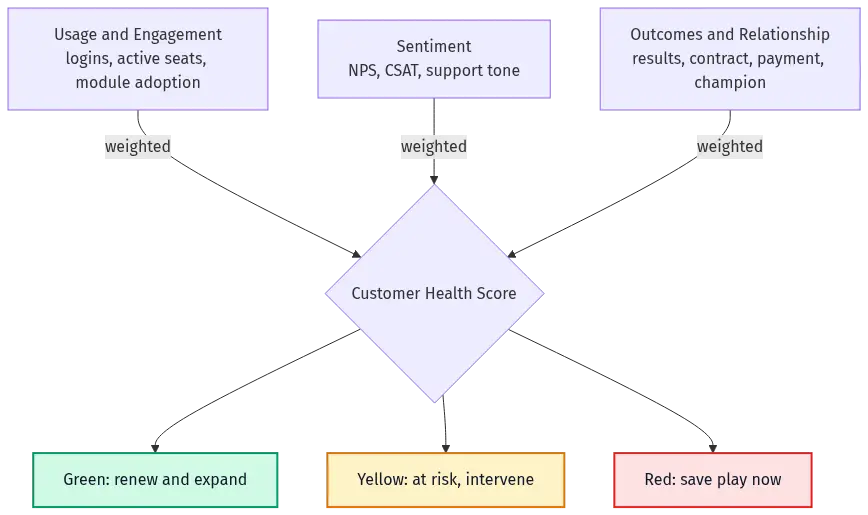
The composite usually pulls from three families of signal:
- Product usage and engagement. How often the customer logs in, how many seats are active, which features or modules they actually use, and whether that usage is trending up or down. This is the most predictive family for most SaaS businesses, and it’s the one founders most often under-weight.
- Sentiment. What the customer tells you directly — Net Promoter Score (NPS) responses, Customer Satisfaction (CSAT) scores, support ticket tone, and the temperature of your last few interactions.
- Outcomes and relationship. Whether the customer is getting the result they bought your product for, plus the commercial and relationship facts: are they on an annual contract, has their champion left, are they paying on time, have they expanded.
The reason you blend these into one number rather than watching them separately is that no single signal is reliable on its own. A quiet customer isn’t necessarily a happy one — silence often means disengagement, which is a negative signal dressed up as a neutral one. A high NPS score from a customer whose usage is collapsing is a customer who likes you but doesn’t need you. The score forces these signals to reconcile into a single verdict you can act on.
The output is a band, not just a number. Most teams translate the raw score into three or four tiers — green (healthy, likely to renew and expand), yellow (at risk, needs attention), and red (likely to churn, needs intervention now). The bands are what make the score operational: green accounts get expansion plays, red accounts get a save play, and your customer success team’s day is organized around the list the score produces.
Why the Generic Health-Score Templates Fail
Search “customer health score formula” and you’ll find a dozen templates that hand you a tidy equation: weight usage 40%, sentiment 30%, support 30%, normalize, sum, done. Copy one of those and you will build a number that looks rigorous and predicts almost nothing.
The reason is simple: there is no universal formula, because the behaviors that predict churn are different in every business. The signals that matter for a marketing-automation platform are not the signals that matter for a property-management system or a developer tool. A generic template hard-codes someone else’s answer to a question you haven’t asked yet — which behaviors actually separate the customers who stay from the customers who leave in my product?
I watched this play out with a company that had a perfectly reasonable hypothesis: customers who log in more often probably churn less. Sensible. But instead of assuming it, they restructured their data to actually measure it. They binned customers by login frequency — under five logins a month, five to ten, ten or more — and calculated the churn rate for each bin. The churn rates were dramatically different across the bins. Now they had a signal that was earned, not borrowed, and it belonged in their health score with real weight.
Then it got more interesting. The same company found that customers who used one particular module — the one that handled customer-facing interactions — churned far less than customers who used the other modules. The reason was structural: that module made the product mission-critical. If the customer cancelled, their customers would email an address or hit a portal that no longer existed, disrupting their business. That single behavior was worth more in the health score than any sentiment metric, because it wasn’t measuring whether the customer liked the product — it was measuring whether they could afford to leave.
You cannot find signals like that in a template. You find them by doing the analysis in your own data. The template is the trap.
How to Build a Customer Health Score That Actually Predicts Churn
Building a customer health score is a four-step process. The first two steps are analytical — you’re discovering what predicts churn. The last two are operational — you’re turning that discovery into a number and then into action.
Step 1: Fix Your Ideal Customer Profile First
Before you build any score, check whether you have a churn problem or an Ideal Customer Profile (ICP) problem — because the single highest-leverage way to reduce churn isn’t a health score at all. It’s refining your ICP to a sub-segment that simply doesn’t churn.
This sounds like a detour, but it’s the opposite. A huge share of the churn at companies under $25M ARR comes from customers who were never a fit in the first place — small accounts that were easy to sell, where the buyer and the end user are the same person, and where the product was never going to be sticky. No health score saves those accounts. They’re leaving anyway, and they’ll take care of themselves inside 24 months. If you build an elaborate scoring model on top of a mis-targeted customer base, you’re spending sophistication on a problem you should be solving with focus.
So before you instrument anything: are you bleeding good-fit customers, or are you bleeding accounts that were doomed at signup? Tune the organization to your ICP first. Then build the health score for the customers worth keeping. (If you’re not sure how to draw that line, this connects directly to how you reduce SaaS churn at the source.)
Step 2: Find the Behaviors That Predict Churn in Your Data
This is the step the templates skip, and it’s the one that makes the score real. Start with a list of hypotheses — guesses about which behaviors might separate your stayers from your leavers. Cast a wide net: login frequency, seat utilization, specific feature or module adoption, time-in-app, onboarding milestones hit, support ticket volume, days since last meaningful action. You might start with thirty or forty candidate signals. That’s fine.
Then test them the way the login-bin company did. For each candidate behavior, segment your customers by that behavior and calculate the actual churn rate for each segment. Most of your candidates — call it 90% of them — won’t make a meaningful difference. You ignore those. What you’re hunting for is the one, two, or three signals that swing the needle hard — the behaviors where the churn rate is dramatically different on either side of the line.
This matters because the difference between a healthy and an unhealthy SaaS churn rate often comes down to a single behavioral trigger you didn’t know existed until you measured it. And the payoff is not marginal. When you find the behavior that genuinely drives retention and you organize your business around producing it, you can move your retention curve enough to change the enterprise value of the company by double digits. One or two signals do almost all the work. Your job is to find which ones, in your business — and that answer varies enormously from one company to the next.
Step 3: Weight, Normalize, and Score
Once you know which signals actually predict churn, you assemble them into a score. Three mechanics:
- Assign weights by predictive power, not by gut feel. The signals you proved matter most in Step 2 get the most weight. If login-frequency and mission-critical-module adoption are your two needle-movers, they should dominate the score — sentiment and support metrics ride along at lower weight. Resist the temptation to weight every signal equally; equal weighting is how you bury your two real predictors under thirty pieces of noise.
- Normalize so signals are comparable. Your inputs live on different scales — logins per month, an NPS score from −100 to +100, a yes/no on whether the key module is in use. Convert each to a common scale (0 to 100 is standard) before you combine them, typically as current value ÷ target value, capped at 100. Otherwise the signal with the biggest raw numbers silently dominates.
- Sum the weighted, normalized signals into one score, then map it to bands. Multiply each normalized signal by its weight, add them up, and you have a 0–100 health score. Then draw your green / yellow / red lines.
Step 4: Turn the Score Into Action
A score nobody acts on is worse than no score, because it creates the illusion of control. The whole point is the operational loop: the red list drives save plays, the yellow list drives proactive outreach, and the green list drives expansion conversations that feed your net revenue retention.
But the most powerful move is the one that’s easy to miss. Once you know which behavior drives retention, you don’t just monitor it — you redesign your business to manufacture it. The login-bin company didn’t stop at scoring module adoption; they rebuilt their customer onboarding to drive every new customer into the sticky module as fast as possible. Another well-known case: a marketing-automation company found that customers who launched their first automation campaign churned dramatically less. So they added a setup fee that funded mandatory onboarding consulting to get that first campaign live — deliberately changing customer behavior to produce the outcome the health score told them mattered. The score isn’t the deliverable. The behavior change it points you toward is.
A Worked Example
Let’s make this concrete with a mid-market SaaS company at $8M ARR. Suppose Step 2 surfaced three signals that genuinely predict churn in their data, and they assign weights accordingly:
| Signal | Weight | What "100" means |
|---|---|---|
| Weekly active logins per licensed seat | 45% | Every licensed seat logs in weekly |
| Core ("sticky") module in active use | 35% | The mission-critical module is in production use |
| Sentiment (blended NPS + recent CSAT) | 20% | Top-box promoter scores across the board |
Now take one account — call it Account A. It bought 20 seats. Lately, only 11 of those seats log in weekly, the sticky module is live but used lightly, and their last NPS response was a lukewarm 6 on a 0–10 scale. Normalize each signal to a 0–100 scale:
- Logins: 11 active of 20 licensed = 55 out of 100.
- Sticky module: live but light usage = 60 out of 100.
- Sentiment: an NPS of 6 maps to roughly 40 out of 100 on their scale (6s are passives leaning negative).
Apply the weights:
Health Score = (55 × 0.45) + (60 × 0.35) + (40 × 0.20) Health Score = 24.75 + 21.0 + 8.0 = 53.75 ≈ 54
If this company’s bands are green ≥ 70, yellow 50–69, and red < 50, Account A lands at 54 — yellow, at risk. And notice why it’s yellow: not because of sentiment (the smallest contributor), but because nearly half the licensed seats have gone dark. That’s the signal with the most weight, and it’s the one dragging the score down. The score doesn’t just flag the account — it tells the customer success manager exactly where to push: get those nine dormant seats activated before the renewal conversation, because unutilized seats are the leading edge of a downgrade.
This is the difference between a health score that’s a number and one that’s an instruction. A blended dashboard average would have hidden the dead seats behind a “fine-ish” overall figure. The weighted, segmented score surfaces the specific behavior to change.
Customer Health Score Benchmark Bands
There is no universal “good” health score, because the score is calibrated to your own data. What’s portable is the structure of the bands and what each one should trigger:
| Band | Typical range | What it means | What it should trigger |
|---|---|---|---|
| Green | 70–100 | Healthy; renewal likely | Expansion and upsell plays; reference and case-study asks |
| Yellow | 50–69 | At risk; mixed signals | Proactive outreach; activate dormant usage; address the lagging signal |
| Red | 0–49 | Churn-likely; intervention needed | Save play; executive sponsor; root-cause the disengagement now |
Two cautions on benchmarks. First, calibrate the bands against your own realized churn. If 35% of your “yellow” accounts actually renew fine, your yellow band is mis-drawn and you’re wasting save effort. Second, watch the trend, not just the level. An account sitting at 65 and falling four points a quarter is in more danger than an account sitting at 58 and climbing. The rate of change is the leading indicator inside the leading indicator — it tells you which way the account is heading before the level itself crosses a band line. For broader context on the retention metrics your health score is ultimately trying to protect, the relationship between health and gross revenue retention is direct: healthy accounts don’t shrink.
Common Mistakes That Break a Health Score
The failures are predictable, and they cluster in a few places.
- Tracking too many signals forever. Starting with thirty candidate signals in Step 2 is correct. Keeping thirty signals in the live score is not. Once you’ve found the one to three that swing the needle, the rest are noise that dilutes your predictors and makes the score impossible to act on. Find the core drivers, then strip the model down to them.
- Equal weighting. Weighting every signal the same is mathematically tidy and analytically useless. It guarantees your two real predictors get outvoted by a crowd of weak ones.
- Treating silence as neutral. A customer who isn’t complaining isn’t necessarily happy — they may be disengaged, which is a leading indicator of churn. Build disengagement (missed check-ins, declining logins, abandoned features) into the score as a negative, not an absence.
- Sentiment-heavy, behavior-light. NPS and CSAT feel like the obvious inputs because customers say them out loud. But what customers do predicts churn better than what they say. If sentiment outweighs usage in your model, you’ve built a satisfaction survey, not a health score.
- Never closing the loop. The score exists to drive a business activity that changes the predictive behavior. If you compute the score and stop there, you’ve built an early-warning system with the alarm disconnected.
Frequently Asked Questions
What is a good customer health score?
There’s no universal number, because the score is calibrated to your own product and customer base. A “good” score is one whose bands accurately predict your realized renewals and churn — if your green accounts renew and your red accounts churn at the rates your bands imply, the score is good, regardless of where the thresholds sit. Validate the score against actual churn outcomes; don’t import someone else’s thresholds.
Customer health score vs. NPS — what’s the difference?
NPS is one input to a customer health score, not a substitute for it. NPS captures stated sentiment at a moment in time; a health score blends sentiment with what the customer actually does (usage, adoption, engagement) and the commercial facts (contract type, payment, expansion). Sentiment alone is a weak churn predictor — a customer can rate you highly and still leave if their usage is collapsing. The health score exists precisely because no single signal, NPS included, is reliable on its own.
How often should I recalculate the customer health score?
As often as your underlying signals move meaningfully — for usage-driven scores, weekly or even daily is reasonable, since a sharp drop in logins or seat activity is exactly the early warning you want to catch fast. Sentiment inputs update more slowly (NPS surveys are quarterly for most teams). The key is to watch the trend between recalculations, not just the latest snapshot.
Which metrics should go into my customer health score?
Only the ones you’ve proven predict churn in your data. Start with a wide list of candidates — login frequency, seat utilization, specific feature or module adoption, onboarding milestones, support volume, sentiment — then segment customers by each behavior and measure the churn rate per segment. Keep the one to three signals that swing the needle hard and weight them most. Discard the rest. The signals that matter are different in every business, which is why borrowed templates underperform.
Does a customer health score work for product-led growth (PLG) businesses?
Yes, and arguably it matters more, because PLG businesses live or die on activation and engagement long before a renewal conversation happens. In a PLG model, the behavioral signals — activation milestones, feature adoption depth, expansion within accounts — are both your health score inputs and your growth levers. The same discipline applies: find the behaviors that predict retention and expansion, weight them by proven impact, and redesign onboarding to manufacture them.
The Bottom Line
A customer health score earns its place only when it changes what you do. Built well, it converts churn from a lagging surprise into a leading signal you can act on weeks or months early. Built lazily — a borrowed template, equal weights, sentiment-heavy, and disconnected from any save or expansion play — it’s a colored dot that makes you feel informed while accounts quietly leak out the bottom.
The discipline is straightforward, even if the work isn’t easy. Fix your ICP so you’re scoring customers worth keeping. Find the one to three behaviors that actually predict churn in your data. Weight them honestly, normalize them, and turn the result into a list your team works every week. Then take the most important step: once you know which behavior drives retention, redesign your onboarding and customer success motion to manufacture that behavior on purpose. That’s where a health score stops being a metric and starts moving your retention curve — and with it, your valuation.
For the broader system of retention and growth metrics this connects to, see how the SaaS KPIs fit together, and the mechanics of calculating LTV that a strong retention base ultimately drives. For external benchmarking on retention and expansion across the industry, the Bessemer State of the Cloud benchmarks and the OpenView SaaS Benchmarks are useful reference points for where healthy retention sits.